Pour ce projet il vous faudra:
-un clavier 4X4
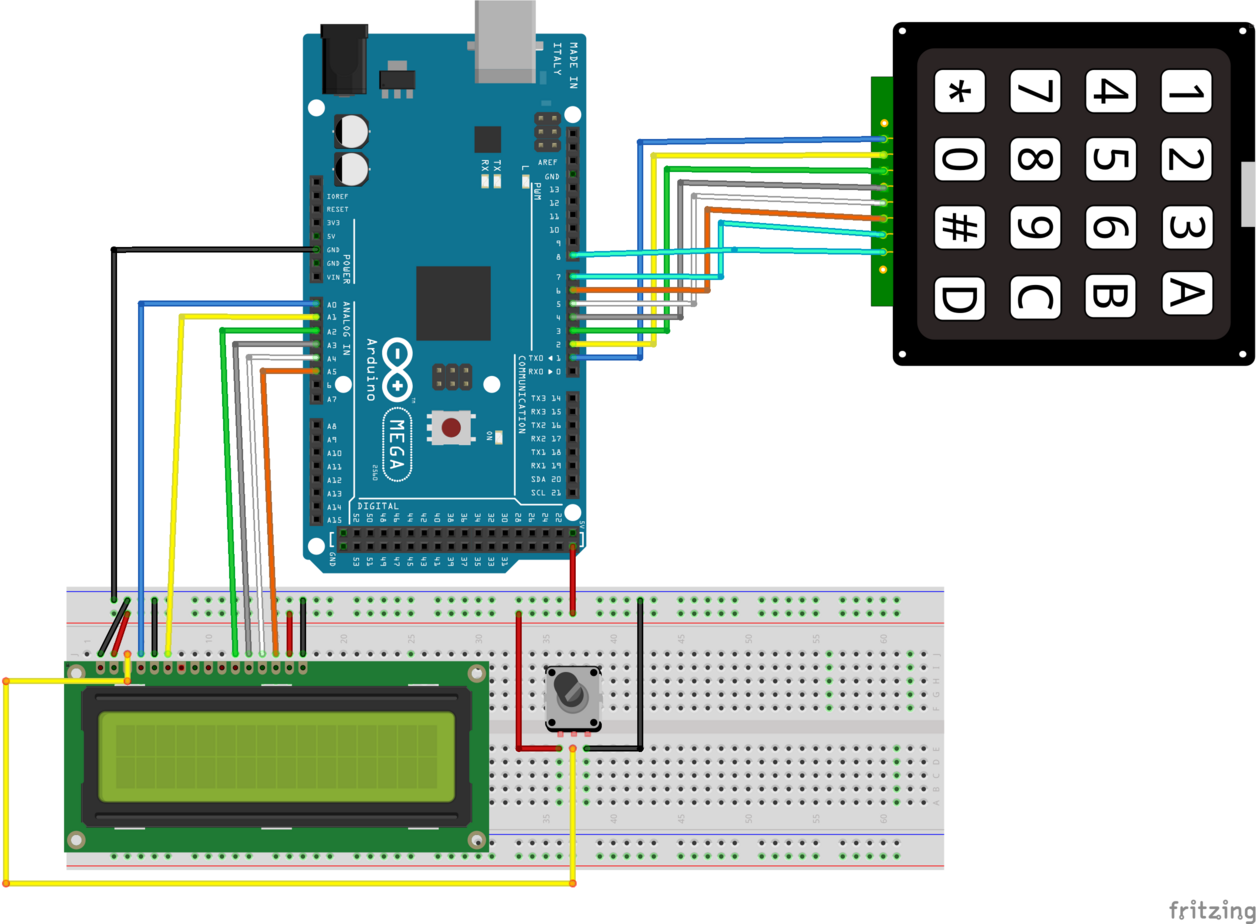
Pour le code il vous suffit de copier de le code et le coller dans l'IDE.Le code est ci dessous:
            #include <LiquidCrystal•h>

                #include <Keypad•h>


                    #define redLED 10

                    #define greenLED 11


                    char* password ="3132";

                    int pozisyon = 0;


                    const byte rows = 4;

                    const byte cols = 4;


                    char keyMap [rows] [cols] = {


                    {'1', '2', '3', 'A'},

                    {'4', '5', '6', 'B'},

                    {'7', '8', '9', 'C'},

                    {'*', '0', '#', 'D'}

                    };


                    byte rowPins [rows] = {1, 2, 3, 4};

                    byte colPins [cols] = {5, 6, 7, 8};


                    Keypad myKeypad = Keypad( makeKeymap(keyMap), rowPins, colPins, rows, cols);


                    LiquidCrystal lcd (A0, A1, A2, A3, A4, A5);


                    void setup(){


                    lcd.begin(16, 2);

                    pinMode(redLED, OUTPUT);

                    pinMode(greenLED, OUTPUT);

                    setLocked (true);

                    }


                    void loop(){


                    char whichKey = myKeypad.getKey();


                    lcd.setCursor(0, 0);

                    lcd.print(" Welcome");

                    lcd.setCursor(0, 1);

                    lcd.print(" Enter Password");


                    if(whichKey == '*' || whichKey == '#' || whichKey == 'A' ||

                    whichKey == 'B' || whichKey == 'C' || whichKey == 'D'){


                    pozisyon=0;

                    setLocked (true);

                    lcd.clear();

                    lcd.setCursor(0, 0);

                    lcd.print(" Invalid Key!");

                    delay(1000);

                    lcd.clear();

                    }

                    if(whichKey == password [pozisyon]){


                    pozisyon ++;

                    }

                    if(pozisyon == 4){

                    setLocked (false);

                    lcd.clear();

                    lcd.setCursor(0, 0);

                    lcd.print("*** Verified ***");

                    delay(3000);

                    lcd.clear();

                    lcd.setCursor(0, 0);

                    lcd.print(" Mert Arduino");

                    lcd.setCursor(0, 1);

                    lcd.print("Tutorial Project");

                    delay(7000);

                    lcd.clear();

                    }

                    delay(100);

                    }


                    void setLocked(int locked){

                    if(locked){

                    digitalWrite(redLED, HIGH);

                    digitalWrite(greenLED, LOW);

                    }

                    else{

                    digitalWrite(redLED, LOW);

                    digitalWrite(greenLED, HIGH);

                    }

                    }